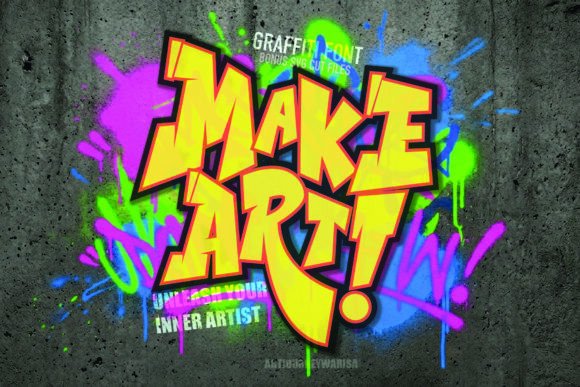
Make Art Font: A Bold Typeface for Creative Rebellion
As a content creator, your typography choices shape how readers perceive your brand and the tone of your message. With Make Art, a high-energy graffiti display font, you gain a powerful tool to elevate your editorial design while staying true to a rebellious, artistic aesthetic. Designed to turn any surface into a masterpiece, this typeface is more than just a font — it's an attitude that resonates across blogs, magazines, ebooks, and beyond.
Make Art for Magazine Covers That Demand Attention
In the world of editorial design, first impressions are everything. A magazine cover needs to stop the scroll or catch the eye in a newsstand. Make Art delivers with its aggressive, interlocking letterforms that scream visual impact. Its graffiti-inspired style works especially well for niche publications like lifestyle magazines, youth culture zines, or event promotions where boldness and energy are key.
Consider using Make Art for titles and taglines on digital covers for newsletters or print editions. The font’s unique character ensures your publication stands out without needing complex imagery or animations. Just apply it to a solid background or overlay it on a photo for instant contrast and creativity.
When to Use Make Art in Print and Digital Formats
While Make Art is a display font, it excels when used sparingly to guide the reader’s attention. For instance, it can be ideal for:
- Cover text in both digital and print magazines
- Issue numbers or headlines in indie or street-style publications
- Accent typography in chapter openers or section dividers of an ebook
- Quote graphics or social media posts that need a punchy headline
Its interlocking nature and graffiti edge make it less suited for body copy but perfect for creating focal points in layouts. You’ll find that it enhances the mood of your publication by visually reinforcing themes of rebellion, artistry, and modernity.
Make Art in Blog Headers for a Strong Visual Hierarchy
Blogs thrive on clarity and hierarchy. Using a display font like Make Art in headers helps separate sections and guides the reader through the page with ease. Whether you're running a personal blog about urban culture or a professional site focused on graphic design, this typeface adds a layer of personality to your content structure.
Try pairing Make Art with a clean sans serif font for subheadings and body text. This combination allows the bold title to pop while keeping the rest of the layout readable and balanced. For example, a blog post titled “Reclaiming Public Spaces” could use Make Art for the main header and Helvetica Neue for supporting text — striking yet functional.
Boost Reader Engagement with Make Art in Lead Magnets
Lead magnets such as printable planners, worksheets, or downloadable guides benefit from strong typographic branding. Make Art can help reinforce the creative or rebellious identity of your content, making it feel more aligned with your editorial voice.
If you’re designing a digital planner or a branding guide for creatives, using Make Art for headings and call-to-action prompts can create a cohesive look that speaks directly to your target audience. It also makes your materials instantly recognizable, strengthening your publication branding over time.
Make Art for Ebook Titles and Chapter Openers
Ebooks often rely on strong visuals to capture interest, especially in categories like self-help, art, or cultural commentary. Make Art brings an edgy, artistic flair to your titles and chapter openers, helping set the tone before a single word is read.
For example, if you're publishing a guide on urban art movements, using Make Art for the title and chapter headings can visually connect the content to its theme. However, ensure that the font size and spacing are optimized for screen reading — even though it’s a graffiti display font, readability at larger sizes is crucial for digital formats like Kindle or PDFs.
Designing with Make Art in Content Branding
Consistency is vital in building a strong brand identity. If your publication or blog aligns with a bold, youthful, or avant-garde tone, integrating Make Art into your content branding can unify your visual language across all platforms.
You might use it for your newsletter subject lines, podcast thumbnails, or social media templates. Just be sure to check the included styles and alternates if the font offers them — these variations allow for more flexibility in maintaining visual consistency while avoiding repetition.
Make Art for Wedding Invitations and Event Branding
Wedding invitations and other event-related materials often require a font that balances creativity with elegance. While Make Art is inherently energetic, it can work wonders for unconventional weddings or themed events that want to break away from traditional typography.
Use it for titles or decorative elements rather than full names or dates. Pair it with a classic serif font for guest details and location information to maintain legibility while showcasing your unique design sensibility. This approach keeps your invitation stylish and easy to digest for your guests.
Why Display Fonts Like Make Art Matter in Editorial Work
Display fonts are not just about looking good; they serve a critical function in guiding the reader’s journey through your content. Make Art adds depth to your design assets by allowing you to craft headers, pull quotes, and accents that reflect your publication’s identity.
Its interlocking forms and graffiti roots give it a distinct visual rhythm that can enhance the storytelling aspect of your layout. In editorial contexts, this kind of typography doesn’t distract — it invites curiosity and sets expectations for what lies ahead.
Make Art for Creator Newsletters and Social Media Graphics
Creator newsletters are becoming increasingly visual. Whether you're promoting new content, sharing behind-the-scenes insights, or launching a course, your typography should match the intensity and passion of your message. Make Art is a creative font that does exactly that.
Use it for feature headers, promo banners, or pull-out quotes. When combined with minimalistic backgrounds and smart alignment, it can become a signature element of your newsletter’s design. On social media, it’s particularly effective for Instagram stories, Pinterest pins, or Twitter threads where bold, expressive text grabs attention quickly.
Font Pairing Tips for Editorial Design
Using Make Art effectively means knowing how to pair it with complementary fonts. Since it’s a graffiti display font, balance is key. Here are some recommended pairings:
- Serif fonts like Georgia or Caslon for body text in printed guides or long-form articles
- Clean sans serif fonts such as Lato or Montserrat for captions, footnotes, or navigation bars
- Subtle script or handwritten fonts for accents or bylines, ensuring a cohesive yet dynamic look
These combinations help maintain modern typography standards while letting Make Art shine in the right places. Always test different weights and spacing settings to ensure legibility and harmony in your layouts.
Make Art in Recipe Ebooks and Lifestyle Guides
Recipe ebooks and lifestyle guides often aim to inspire action and emotion. Make Art fits naturally into this space, especially for headings like “Breakfast Revolution,” “Urban Cooking,” or “DIY Living.”
The font’s high-contrast strokes and graffiti vibe can add a sense of urgency or excitement to your content. For instance, using it in a lead magnet titled “Make Art with Your Ingredients” could pique interest and encourage downloads. Just remember to limit its use to short phrases or section headers to preserve readability.
Readability Across Platforms with Make Art
One of the most important considerations when using any font in editorial work is how it performs across different mediums. Make Art is designed for maximum visual appeal, but here’s how to keep it usable:
- Screen Reading: Use large point sizes (24pt+) to ensure clarity on digital screens
- PDF Exports: Embed the font to prevent distortion, especially when using vector graphics
- Mobile Layouts: Avoid small text applications — let it speak only in headers and highlights
- Print: Test at various resolutions to confirm it holds up in physical form
By following these best practices, you can leverage Make Art to enhance your design without compromising user experience.
Commercial Licensing Considerations for Make Art
If you plan to use Make Art in commercial fonts for paid publications, client projects, or digital downloads, always verify the licensing terms. Most premium fonts offer commercial usage rights, but specifics vary depending on the platform and vendor.
Ensure the license includes the necessary weights and styles for your intended application — whether it’s a paid newsletter, a client magazine, or a course workbook. Some licenses may restrict use in web environments unless you opt for a web font version, so double-check if you're embedding it in online content or apps.
Final Thoughts on Integrating Make Art into Your Workflow
Choosing the right display font can transform your editorial projects from standard to standout. Make Art isn’t just another Fonts option — it’s a statement. When used thoughtfully, it supports your visual hierarchy, reinforces your publication’s mood, and builds a lasting impression on your audience.
Whether you’re crafting a digital magazine, a wedding guide, or a lead magnet for your next project, consider how Make Art can inject a spark of rebellion into your design. By combining it with more neutral fonts and focusing on strategic placement, you’ll maintain professionalism while embracing a more expressive visual language.